
ArtFlow: Paint Draw Sketchbook
Contains ads

star
33.8K reviews

Rated for 3+
info
5M+
Downloads


About this app
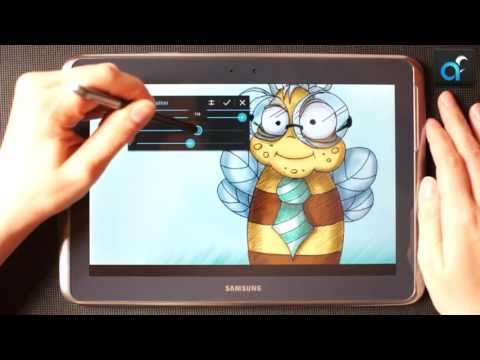
Convert your device into a digital sketchbook with more than 80 paint brushes, smudge, fill and an eraser tool. This fast and intuitive painting and drawing application will unlock the full power of your imagination. With support for pressure sensitive pens (like Samsung's S Pen) your device will be transformed into a real canvas.
Important: this is a free application with advanced features requiring a pro license in-app purchase. Single licence purchase will activate all devices associated with your Google account.
Features (some functions require pro license):
• High performance (GPU accelerated) paint engine
• Canvases up to 6144x6144 with 50 layers*
• Stylus pressure support
• Pressure simulation for touches†
• 100+ brushes and tools (including smudge tool and gradient fill)
• Create custom brushes from imported images
• Selection and selection masks
• Layer clipping mask
• 10 layer filters (HSV adjust, brightness & saturation, color curves and more)
• Material design inspired, fast, fluid, intuitive and accessible user interface
• Import and export supports PNG, JPG and PSD (Photoshop Document)
• NVIDIA DirectStylus support
• Palm rejection - no more accidental zooming and panning when drawing†
*) depending on device and available memory
†) some devices are incompatible with pressure simulation and palm rejection
You can paint, sketch and draw with ease thanks to fast and fluid brush engine. ArtFlow aims to replace your physical sketchpad and become universal art studio type application for Android™.
Artworks by:
Oleg Stepanko (https://instagram.com/rwidon)
Miguel Alvarado (https://www.instagram.com/3d.mike)
David Rivera (http://www.facebook.com/BlownHand)
Jon Mietling Portal Dragon (http://portaldragon.com)
Rob Pennycook
Marco Hurtado
Joel Ukeni (https://www.instagram.com/j.ukeni/)
Enrico Natoli
Andrew Easter
Andrei Lanuza (http://plus.google.com/+AndreiLanuza)
David Mingorance (http://davidmingorance.weebly.com)
EB Leung
Geremy Arene (http://www.youtube.com/geremy902)
ViBu (http://candynjuice.blogspot.com)
Oskar Stalberg
Unlicensed version limitation:
• 20 basic tools
• 3 layers
• Undo limited to 6 steps
• No PSD export
Simple yet powerful sketch and paint application for artist of all ages
Updated on
Safety starts with understanding how developers collect and share your data. Data privacy and security practices may vary based on your use, region, and age. The developer provided this information and may update it over time.


Ratings and reviews
20.9K reviews

A Google user
- Flag inappropriate
May 30, 2019
I find it to be the best digital art app. Over the years I keep coming back to it. Basically it has all the primary, crucial features that any of the others have, and I find the layout to work best. I only wish that the smudge feature worked a bit better. I remember it used to work wonderfully but changed with updates. But it works well enough, and it's otherwise an excellent digital art app.
9 people found this review helpful
Artflow Studio
October 14, 2016
Please contact us at info@artflowstudio.com and we will fix this ASAP
A Google user
- Flag inappropriate
March 16, 2020
I use this app often and it gets the job done nicely. I use the pro version which is much better than the free version because the free version only has limited layers. The thing I don't like about this app is that there's a point where when you have a lot of saved files, you'll constantly crash and it'll be hard to see your drawings again.
1 person found this review helpful
Artflow Studio
May 27, 2017
Please contact me directly at info@artflowstudio.com and I'll resolve this ASAP
A Google user
- Flag inappropriate
- Show review history
February 19, 2020
I love using this app to draw, however sometimes the app will crash while I'm drawing (specifically when I add a new layer or use the bucket tool), and it won't open for a a few hours (and when it does, the art is either deleted or any changes I made get erased), which gets very annoying. Four stars because the good things about this app outweigh the bad things.
What’s new
Play Billing library update to v8.0.0
Supported android version update (target SDK level update)
App support
About the developer
BYTESTORM SOFTWARE BARTŁOMIEJ JANUSZ
bjanusz@artflowstudio.com
166a Ul. Wyzwolenia
41-710 Ruda Śląska
Poland
+48 605 788 781


