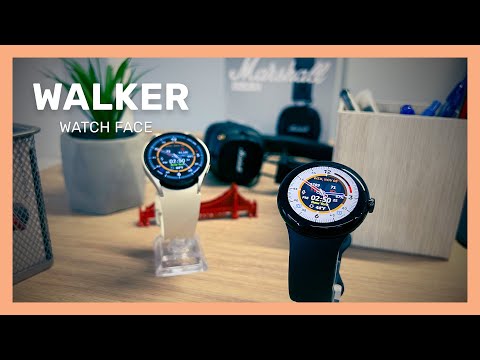

Walker Hybrid Watch Face
Contains ads

star
4.46K reviews

Rated for 3+
info
100K+
Downloads


About this app
Elevate your smartwatch with Walker, the ultimate hybrid watch face designed exclusively for Wear OS. Combining the sleek efficiency of a modern digital clock with the timeless elegance of traditional analog watch hands, Walker delivers the perfect balance of tech and classic style to your wrist.
Try it for free today and customize your smartwatch experience! Unlock Premium to unleash the full power, custom complications, and premium color themes.
★ Key Features (Free Version)
* Smooth analog watch hands combined with a clear digital clock display
* High-quality, battery-optimized design for everyday wear
* Clean minimalist layout that complements any style
* Basic customization options to match your look
★ Premium Features (One-Time Unlock)
* Advanced custom complications (weather, steps, calendar, and more)
* Premium color themes and custom accents to match your outfit
* Live phone battery complication (requires companion Android app)
* Ambient mode optimization to save battery life
★ Why Choose Walker?
Walker is engineered specifically for the modern Wear OS smartwatch user who refuses to compromise between traditional style and smart functionality. It is lightweight, battery-efficient, and designed to look stunning on both round and square watch displays.
★★★ COMPATIBILITY IMPORTANT ★★★
This watch face strictly supports Wear OS by Google smartwatches (including Galaxy Watch 4, 5, 6, 7, and Ultra).
NOT SUPPORTED: Older Samsung watches running Tizen OS (Gear S2/S3, Galaxy Watch 3), Huawei Watch GT/GT2, Xiaomi Amazfit GTS, Xiaomi Pace, Xiaomi Bip, and other non-Wear OS operating systems.
★★★ FREQUENTLY ASKED QUESTIONS ★★★
Q: Does it support Samsung Galaxy Watch 4 / 5 / 6 / 7?
A: Yes! Our watch faces fully support modern Wear OS smartwatches, including the Galaxy Watch series and Pixel Watch.
Q: I purchased Premium on my phone, why isn't it on my watch?
A: Syncing can sometimes take a few minutes on the Play Store. Do not worry, you will not be charged twice. Any accidental duplicate orders are automatically refunded by Google.
Q: Can I see my iPhone battery?
A: No, the phone battery complication requires our Android companion app due to iOS system limitations.
!! Need Help? !!
If you experience any issues or have questions, please reach out to us directly at richface.watch@gmail.com. We are here to help!
View our full FAQ: https://richface.watch/faq
Privacy Policy & Permissions: https://www.richface.watch/privacy
Elegant hybrid watch face with digital & analog style for Wear OS smartwatches.
Updated on
Safety starts with understanding how developers collect and share your data. Data privacy and security practices may vary based on your use, region, and age. The developer provided this information and may update it over time.
- No data shared with third partiesLearn more about how developers declare sharing
- This app may collect these data typesMessages and Device or other IDs
- Data is encrypted in transit
- Data can’t be deleted


Ratings and reviews
3.93K reviews

Steve Procter
- Flag inappropriate
December 17, 2023
Not a bad looking watch face, but the fact the outer ring is either black or white on all presets puts me off using it. Would be nice if we could choose the colour as it's quite a large area and white is too bright for me personally. The rest of the functions all work exactly as described. No idea what muppets are doing who have given this bad reviews, the Dev does not deserve that as its working great. If I could have a choice of any colours on the outer ring, I'd probably buy it :)
40 people found this review helpful
RichFace
January 5, 2024
Thanks for your support and feedback! We deeply respect your advice, and we will try to combine your feedback with our R&D, in order to provide better products.

Jo D
- Flag inappropriate
- Show review history
September 12, 2024
App stuck in at location permissions screen when you don't allow, what if I don't need at weather at this stage and just want to check out the watch face? Even after passing the location screen I managed to get to the store somehow with other watch face option but the app fails to load the watch face, takes me in a loop between face options and google store. 1 ⭐ for the app. Dev response not required
RichFace
September 13, 2024
Well, that should not be the case. If you don't allow some of the permissions you simply won't see its data. Can you tell us what watch and what WearOS you have so we can investigate this further. Thank you!

Lindsay Eisan
- Flag inappropriate
January 18, 2025
Despite repeated attempts to correct, the weather app just does not work, it always defaults to global even after tepeated attempts to use location. Openweather didnt work at all so using YR which works on my phone with accurate location data but nit on watch. Watch is galax5 5 pro and phone is galaxy s23ultra. Tried and verified settings on both devices uninstalled and reinstalled restarted you name it I tried it to no avail. In app help not useful either.
RichFace
January 22, 2025
Sorry but we think that you have not granted the permissions for the watch face itself. We can not reproduce your error.
Y.R Weather is showing only the current temperature, and Open Weather is showing current temperature + forecast when you tap on the weather complication. Please make sure that you have all permissions granted for the Walker app.
App support
About the developer
NoviSmart OG
richface.developer@gmail.com
Zentagasse 6/20
1050 Wien
Austria
+387 66 445-577


